Blue Screen at 2:47 P.M.: A Survival Guide for Tech Failure on Exam Day
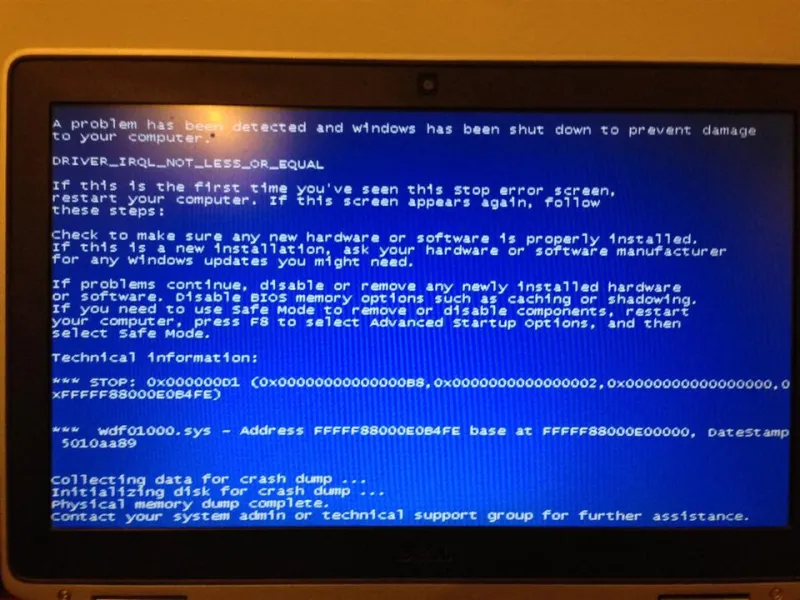
Photo: WhiteWindow, CC BY-SA 4.0, via Wikimedia Commons
It's 2:47 on a Tuesday. The exam closes at 3:30. You're on question 34 of 50, finally in a rhythm, when the spinning wheel appears. Then the router blinks orange. Then your laptop cheerfully informs you that it has no internet connection.
If that hasn't happened to you yet in an online course, it probably will. Not because you're unlucky, but because online exams run on a chain of fragile things — home internet, aging laptops, proctoring plugins, campus servers under load at the same moment thousands of other students log in. The students who come out of a tech failure with their grade intact are rarely the ones who stay calm by temperament. They're the ones who had a plan before anything broke.
Before test day: the boring prep that actually saves you
Most of the damage from a mid-exam crash is decided in the week before it. Work through this list at least 48 hours ahead, then again the morning of:
- Run the system check twice. If your course uses a lockdown browser, Honorlock, ProctorU, or any similar tool, do the compatibility test two days out and the day of. Updates roll out constantly and a plugin that worked in September can fail in November.
- Know the tech policy in writing. Find the sentence in your syllabus about technical difficulties and screenshot it. Some instructors drop your lowest exam; others say "no exceptions." You need to know which professor you're dealing with before you're begging at 3:05 p.m.
- Set up a backup connection. A phone hotspot takes two minutes to test and has rescued more exams than any study guide. If your building has spotty service, find the one room where it doesn't.
- Kill the software that kills exams. Turn off automatic OS updates, pause cloud sync, close every tab you don't need, and silence notifications. Cloud backups and background downloads are a shockingly common cause of mid-exam lag.
- Plug in. A laptop at 40 percent is a countdown timer you didn't ask for. Charge it, keep it plugged in, and if you can borrow a surge protector, use one.
- Save the emergency contact. Your professor's email, the course TA, and your school's IT help desk number — on paper or on your phone, not only inside the LMS you might not be able to open.
One more: write down the exact start time of your exam and the moment you begin. If you have to file a technical difficulty report later, that timestamp is the first thing anyone will ask for.
The first five minutes after it breaks
This is where grades are won and lost, and the instinct to panic-refresh is the enemy.
Minute one: stop clicking. Screenshot the error before you touch anything. If the page is frozen, photograph your screen with your phone — yes, really. A photo with a visible clock in the background is evidence.
Minute two: try exactly one fix. Switch to your hotspot, or refresh once. One attempt. If it fails, stop troubleshooting and start documenting.
Minute three: message your professor from your phone. Not from the laptop that just died. Keep it short: course, exam name, time the failure happened, what you can see, and what you've tried. Send it even if you think you'll be back online in ten minutes. A timestamped message sent during the outage is worth more than a perfect explanation sent three days later.
Minute four: keep working if you can. Some platforms autosave every answer. If you get back in, don't restart from the beginning — check which questions registered and continue from there.
Minute five: decide whether the clock still works for you. If the exam is timed and you've lost twenty minutes, message your professor that the timer is running while you're locked out. Some systems can reset an attempt; many can't, and the sooner they know, the more options exist.
Document like you're building a case
When you file for a make-up or an extension, you're not asking for sympathy — you're submitting a record. Gather:
- Screenshots and phone photos with visible timestamps
- The exact error text or code, typed out
- Your internet provider's outage page, if there is one, plus your ticket number
- A note on what you completed and what you didn't
- The confirmation number from any IT help desk ticket you opened
Put all of it in one folder the same day. Memories get fuzzy by Thursday, and "I think it happened around three" is not a strong supporting detail.
The follow-up email that protects your grade
Send it within a few hours, while the event is fresh.
Subject: Technical failure during PSY 210 Exam 2 — Nov 14, 2:47 p.m.
Hi Professor Lang,
I was locked out of Exam 2 at 2:47 p.m. today with about 34 questions answered. My connection dropped entirely; I switched to a hotspot and could not reconnect to the exam. I sent a message at 2:52 from my phone.
Attached are screenshots of the error, a photo of my screen at the time, and my ISP's outage notice for my area. I have an IT ticket open as well (#48812).
Could you let me know what my options are? I'm happy to retake the exam or provide anything else you need.
Thank you, Jordan Ellis, ID 00451288
Attach the evidence, state the facts in order, and ask one clear question. Don't argue about fairness in the first message — that conversation comes later, if it comes at all.
If the answer is “that's on you”
Sometimes it is, honestly — a dead laptop battery at 11 p.m. is a different situation than a regional outage. But if you had done the prep, documented the failure, and communicated immediately, you have grounds to escalate: your instructor first, then the department chair, then the office that handles online learning or student grievances at your school. Keep every message in one email thread so there's a clean record. Most institutions have a written technical difficulty policy; find it and quote it politely.
The short version
Test your setup twice, keep a hotspot ready, screenshot everything, message from your phone within minutes, and ask one clear question in writing. You can't prevent every crash. You can absolutely prevent a crash from turning into a zero.